Thursday, September 20, 2007

"don't tase me, bro!"

according to google, this phrase is the 11th most searched for item. it is now also one of the most discussed topic on facebook (over 80 groups especially made) and youtube. here's why.


NOTE: VIDEO DEPICTS VIOLENCE AND HAS A SLIGHT SQUIMISH-FACTOR


CNN september 19th

GAINESVILLE, Florida (CNN) -- It has been 48 hours since college student Andrew Meyer was stunned with a Taser during a forum with Sen. John Kerry, and some students are still in shock over what happened.
But other students at the University of Florida are already tired of hearing about it.

While about 350 students protested the incident Tuesday, the opinions on campus seem to be evenly divided over whether the officers acted properly.

On the popular online networking Web site Facebook.com, students from around the nation have already created more than 80 groups discussing what happened Monday. Even among those groups, the count is almost split between the number who oppose the police's action and those who support their decision.

"I was pretty horrified by what happened. I was shocked that the people we are supposed to trust would turn against us," said Vanessa Wood, a freshman who is majoring in psychology.

This is what I saw at the Kerry forum on Monday: Meyer, a 21-year-old telecommunications major, jumped up to the microphone already flanked by University

He interrupted another student's question, and although Kerry had earlier said he was taking no more questions, he told Meyer he'd take his comments next. Kerry asked the police to allow Meyer to speak.

When it was his turn, Meyer first asked about the 2004 presidential election and followed with statements about whether President Bush should be impeached.

At that moment the microphone was turned off and police began to take Meyer out of the auditorium. Meyer then started to struggle with the officers.

As they pulled him toward the exit, Meyer broke free and tried to get away. At that point, six officers tackled Meyer to the ground and told him to roll over.

He continued to yell for help and a female officer warned Meyer if he did not stop he would be Tased. He kept yelling and one of the other officers gave the order to Tase him.

The audience remained seated and watching the confrontation until they heard the loud zap of the Taser. Then several people at the event started yelling at the officers.

"I was startled by the noise, considering what was happening in front of me. And after they Tasered him there was a stench that was not overpowering but it was unsettling," said Ben Omar, a University of Florida graduate student.

The videotape of Meyer screaming as he was shocked quickly got the attention of news services and became a YouTube hit.

Campus rumors now circulate that Meyer, known as being a prankster, was simply trying to be obnoxious and get attention at the Kerry speech.

Meyer spent a night in jail on charges of disturbing the peace and resisting an officer. Later, the school's president, Bernard Machen, said two police officers involved were placed on administrative leave.

Since the incident, Meyer has kept a low profile. But other students haven't been so quiet, with Tuesday's rally protesting what the students' claimed was a case of police brutality and another rally being planned.

my thoughts on this? at first, i saw a shorter version of that video with just the police tasing the poor guy and thought that it was one of the most horrific thing i've ever seen. but i found this longer video and now i'm not sure. still, tasing him was not necessary at all. he was on the ground with 4 officers over him. he couldn't possibly do anything then.

anyway, "Don't Tase Me, Bro!" has become the newest cultural touchstone of our pop-cultural lexicon. t-shirts of the phrase are made and in hot demand.


Saturday, September 15, 2007

how to thrive the uni life

first of all, i would like to congratulate to all those received their scholarships. you all will be in an experience of a life time. today, i'll share with you the general secrets of success in the new study environment.

it's not really any different from the previous academic experience you've been through before. many things are the same only at a higher academic level. the main differences you will find are that:
  • you have more control and independence over what, when and how you study
  • understanding and critical thinking are more important than remembering.

1. get organised!
it's not like O-level or A-level, where things are just relaxing and most things are done for you. it's up to you to organise yourself and your study. you may find that all of your assignments are due at the same time, so a bit of forward planning for staggered deadlines will save a lot of panic at the last minute.

2. get yourself informed!
about things like timetables, room locations, deadlines and guidelines for assignments. it’s your responsibility to do this – no-one will remind you! your Course Handbook is your best source for what you need to know about your course of study. make sure you know where you’ve put it, or how to access it online – you’ll probably need it later in the term.

3. make notes! - lots of 'em...
getting handouts is a rarity in university classes and if you try to write down everything the lecturer says you won’t be able to focus on listening. make notes of selected points and underline the important ones to make them obvious. add any thoughts of your own that arise, but make it clear that they’re your own ideas, perhaps by circling them.

4. understanding is key
at university, it's not about how much you know, but how you understand it. that usually means knowing the major issues and debates and putting what you’ve found out about the topic into that context. it also means being able to communicate your understanding, so knowing how to structure your work and write clearly is really important.

5. leave your procrastination back home!
again, get yourself organised. lecturers give assignments with a very long deadline. you have to have a really damn good reason to not finish or extending it. of course, most of us like to do things at the very last minute and managed to do so time and time again. but in university, it's just not worth the stress and most of the time, getting a low grade in the end. do it early and do it well.

6. ask for help when you need it.
there’s a lot to get used to when you come to university, and no-one finds it all easy. one of your most important responsibilities is to yourself - to recognise when you need help and to know where to get it. there are plenty of people whose job is to help you get yourself sorted. you can talk to your personal tutor, or a Study Adviser, or a Counsellor.

7. be financially aware!
it’s a valuable habit to get into and being a student, with all the difficulties of juggling expenditure, is a good time to start practicing it. keep a log of how much money you have coming in and how you are spending it. that way you can tell exactly where your money is going and make important conclusions from it. found out you are spending the bulk of your money on study books? look at buying them second hand (ebay or amazon) or using the library.

to put it simply, just be aware of what you're spending. i've seen people buy useless things and most of the time at the spur of the moment. this is especially for newbies. not even been in uk for a day, already buying expensive stuff like brand new £25 dvd (5 of them) and £100 shoes - very foolish and unnecessary. please be a bit cautious of your spendings and don't be so iski.(very stupidly eager)

8. explore your campus!
get to know your campus quickly. it’s where you will spend a lot of your time and by acclimatising yourself to it early, you will settle in much more quickly, making those first few weeks more pleasant. you will also learn the little quirks like the most quiet place to study, or the busiest time in the canteen. by knowing about your campus you will be able to make the most of the facilities. any half-decent college/university will host plenty of free/cheap entertainment and special events. they are much better for your finances than expensive nights out round town.

9. make friends! not just from the same nation.
not really meaning to sound stuck-up or anything but you'll be in a different countries with people from around the world in uni. and you're just wasting that culture-sharing by hanging with other people who are from the same country as you. of course, i'm also not saying to completely ignore them. i'm just saying use this time to spread your wings and your social network.

consider getting to know and befriend as many people as possible, whether it be other students or lecturers. It makes acclimatising to university much more easy if you have people you can talk to and trust. it can also open up lots of opportunities. a lecturer you can comfortably talk to may be able to provide advice on your work, and it can be so much easier to do group work if you have friends on your course. freshers week is great for achieving all this as there will be so many other people in the same position as you. Look to join groups that have the same interests as yours!

more importantly, be friends with seniors. they have experience and it would be a waste to not leech out every bit of tips and tricks, whether it be in studies or any other general tips on cheap transport and food.

10. have fun!
this is an experience of a lifetime for all of you. don't waste a second of it being cooped up in a room (except when assignments are due). go out have the best safe fun of your life!

Thursday, September 13, 2007

britney spears, kid rock and the girl from highschool musical

i've never talked about celebrity gossips and mindless entertainment news (like perez hilton is famously known for) but i've been watching a lot of tv and youtube lately and here are the some that i feel like sharing.


i watched the video music awards last night. personally, i didn't like the atmosphere of the place. different parties going on in different rooms? so weird. and the usual, 'just seats' in the audience area was changed to tabled hall, made the event really quiet. but anyway, that is beside the point. the main story, which i'm sure you know by now, the legendary britney spears. describing her performance as sloth-like is a understatement of the year. it looked like she wasn't giving any effort at all. and her post-baby body was very obvious. sources say, she sobbed after her abysmal performance. not a comeback that people were hoping for. on the up side, her song was very catchy.. ok, i found it catchy. so sue me..

another big story was the whole kid rock and tommy lee fight. here's what mtv news said,

According to eyewitnesses, Lee — sitting at the same table as Diddy — jawed at Rock as he made his way toward the Bad Boy CEO, with whom he was supposed to present the show's final performance. It wasn't clear exactly what Lee said to Rock, but apparently after his words, Rock slapped the drummer, according to eyewitnesses. Lee, one eyewitness said, attempted to fight back but, before he was able to land a blow, was punched in the face by Rock.

Many inside the venue — including Jermaine Durpi — were oblivious to the fight taking place behind them. Others either tried to get out of the way as security tossed chairs to reach the outbreak or were stunned and didn't quite know what was going on.

Security quickly detained both men, with Lee being immediately removed from the venue. Rock, with his cigar still in his mouth, was held back momentarily until Lee left and calmly walked out alongside security.

"I never hit nobody for nothing before," Rock was overhead saying in the lobby of the casino. "I told him to shut the f--- up."

According to a spokesperson for the Las Vegas Police Department, Rock was cited for misdemeanor battery for his assault on Lee. Rock was not detained or taken into police custody but was issued a summons. He'll need to return to Vegas for a future court date, and if convicted, he faces a $500 fine and up to six months behind bars.

i even read somewhere that kid rock went looking for tommy in his hotel room but kicked down a door with a frightened family inside. he apologized and signed autographs for them.

okay.. i wanted to talk about your beloved highschool musical chick (dunno the name, don't care either) but my motivation for this post is gone now.. watch the video.. hehe. i love what-the-buck.


Tuesday, September 11, 2007

urine

what a title eh? i would think that'll catch your attention. this topic came about, of course, in the toilet. i was attending to nature's call when i noticed, not one.. not two.. but three guys who just left without washing their hands! they didn't even acknowledge the existence of the taps! if you're one of those people, please read on.. for the sake of your health. and while on the topic, some really fun but gross facts about the yellow liquid. i hope you're not having a drink while reading this.


why is it important?

if the fact that it's just really disgusting isn't enough, a number of infectious diseases can be spread from one person to another by contaminated hands, particularly gastrointestinal infections and hepatitis A. washing your hands properly can help prevent the spread of the organisms that cause these diseases.
some forms of gastroenteritis can cause serious complications, especially for young children, the elderly or those with a weakened immune system. drying your hands properly is as important as washing them.


when to wash?

after going to the loo isn't the only time to wash your hands. you should wash your hands thoroughly:
  • before preparing food
  • before eating
  • between handling raw and cooked or ready-to-eat food
  • after going to the toilet or changing nappies
  • after smoking
  • after using a tissue or handkerchief
  • after handling rubbish or working in the garden
  • after handling animals
  • after attending to sick children or other family members.

what is the proper way to wash our hands?
  1. use large amounts of warm, running water and liquid soap to lather hands and wrists. Scrub all surfaces of your hands and fingers for at least 15 to 20 seconds (note: this is about the same time for you to completely sing the birthday song, if that'll help you remember.) bar soaps can harbor germs which cause infection. Therefore, use liquid soap if available.
  2. rinse hands well clean, running water.
  3. rinse with hands pointing down to prevent rinse water from running up your arms.
  4. dry your hands with either a disposable paper towel or hot air. make sure your hands are really dry.
  5. shut off the faucet using the paper towel as a barrier between your clean hands and the faucet handle.

fun facts!
  • 80 percent of all infectious diseases are passed by human contact, either direct or indirect? That includes viruses like pneumonia, salmonella and the common cold.
  • urine is sterile and is safe to drink! oh yes it's true.. this is what i found..
Most people forget that urine is mostly water. Water is the filter of the human body. Waste that our cells produce, collectivley known as urea, ends up in our bloodstream. Our kidneys remove the urea, along with excess water, and the result is urine. When you drink your own urine, you are putting more water back into your system, but you are also putting in the stuff your body is trying to get rid of.

This is not bad for you at first, but if you drink no water, only your own urine for an extended period of time, the urea content of your urine will increase. It becomes difficult to urinate, painfull sometimes. But note, this is after drinking your own urine for days.
Its like using a dirty air filter. It works, but soon the filter will become more and more clogged with dust. Just like an air filter, the urine, which now must dispose of more and more waste in the same amount of water, becomes saturated. This is observable, as if you do drink your own urine over a few days it becomes darker in color. Similarly, the more water you drink, the lighter your urine is.

Astronauts on the Apollo 13 mission were stuck in space without power. For the last four days or so of their journey, they had run out of liquid water. They drank their own urine, which kept them from dehydration while they came home.

bottom line, wash your hands! it's a simple task that'll make you healthier. want to know more. click here.

Sunday, September 09, 2007

how to speed up your computer

there's nothing i hate more than a slow pc/laptop. it just gets my goat when i have to wait more than 5 seconds for a program to start up or website to completely upload on the screen. *cough! my sister's laptop* technology is supposed to be fast! and especially today with all the new high-tech chips and super-powered thinga-ma-jigs.

you might say.. "but, oh wise sham, i have owned my laptop for years now.. so, it can't be as fast as it was once before. surely, there's no way around this other than emptying my wallet/purse buying a new one, is there?"

that's where you're wrong! if your pc wasn't that slow to begin with, then there's hope. i know what you might be thinking.. sending it off to a computer store and have it fixed.. not necessarily.. you can do your own maintenance. i've had my laptop for almost 4 years now and it's not high-tech or anything either.. i'm not even going to post a picture of it because that's how un-high-tech it is.. but it still runs fine with little glitches. it's all because of good maintenance. and today, i shall share my top pc maintenance tips.

NOTE: for pc people only. for mac users (that means you maurina), look elsewhere. i can't help you here.

pc/laptop maintenace 101

1. get rid of your junks!
a full pc means a slow pc. keeping your hard disk space to more than 15% is the minimum. this is important, which i'll tell you why later. and i'm not only talking about files you saved, music, pictures, etc. the programs that you've installed and afterwards uninstalled could still be in your pc somewhere.
say for example, you've installed a game from EA games. you played it for months.. bored of it.. uninstalled it. and yet if you go to :-
  • my computer
  • then, C:
  • then, program files
you'll be surprised to find a folder named EA games with stuff still in it. sometimes, huge ones. this takes up unnecessary space. delete the whole folder. it won't matter that much. if it did, you wouldn't have uninstalled it to begin with. this is especially important to those of you who love to d/l those mini games (feeding frenzy, diner dash, burger island, etc) and uninstalled it after it expired. it's still in your pc! get rid of them!


2. a faster startup!
you turn on your laptop. went away to let it load. make a cup of coffee. finished drinking it. come back. it's still not on the finished loading your desktop. if this is you, i weep for you, you sad sad person. here's the problem...

it's the startup programs that's slowing you down. look at the bottom right at the system tray (next to the clock). if it's almost filling up your whole taskbar, that's the problem. those are programs that are running in the background. these are tiny programs that are robbing you of memory and processing power. some of them you need, while most you don’t. some of the programs you DON’T need are printer icons, CD burning icons, shortcuts to programs (such as video settings), any Instant Messaging Programs, etc. Just because these programs aren’t always running, doesn’t mean that you still can’t print, burn CDs or Instant Message. They can be run when you need them, from a shortcut. get rid of them! go to:-
  • start
  • run
  • type in MSCONFIG
  • you'll see the 'start up' tab. click on that.
  • here, untick those that you don't need right away. example: ituneshelper, adobe reader speed launch, quick time task. you might have not used it in months! so, untick those and other that you're sure you don't need.
  • click apply and on the next start up, it'll make a HUGE difference.
also, check your system tray regularly when using your pc. if you see the msn messenger icon on it even though it says you're offline, just exit it. it just sits there being useless and slows the pc down.

3. clean up your disk!
one of the simplest way to clear up the clutter and make your pc faster. go to:
  • start
  • all programs, accessories
  • system tools
  • click on 'disk clean up'
click here for a detail description of what it is but basically, it's just what it says. it cleans up your drive of any useless data you have on your pc. if you're worried that it might clean up something you still need, don't. it'll know what you need and what you won't need. there is also an option there for it to clean up 'temporary internet files'. those are data of past websites that you've visited. it kept a log so that the next time you visit that website, it'll load faster. by default, it'll already be ticked. but if you're the sort of person who can't remember website addresses and depends on the first few parts of the address and let the browser fill up the rest or you want it to load faster, untick this box. but personally, i think it takes up a huge space (in just 3 days, i accumulated about 60mb of temporary internet files ':s ) . and i just bookmark my favourite sites.

4. make your windows basic!
do you have a very impressive looking desktop? colourful backgrounds, a mouse cursor with blinking lights and colourful trails behind it, impressive visual effects and a theme that makes people go "wow.." that's good and all but is it making your pc slow?

just go back to basics people. it's pretty to look at but not very practical. below, an article i found that describes this perfectly..

By default, EVERYTHING is turned on in Windows XP. It isn’t very streamlined for performance, but rather for appearance. You can turn off a few of the unnecessary features, and Windows will still work just fine, and maybe a little faster.

To do this, right-click on My Computer and click on Properties. Click on the Advanced tab. Under the Performance section, click on the Settings button. On the Visual Effects tab, you will see a list of check boxes. By default, these are all on. You really don’t need any of them. If you choose one of the radio buttons at the top, say, Adjust for Best Performance, then all of the check boxes will turn off. This will noticeably speed up your computer. You can go through the check boxes one by one, and determine which ones you can and can’t live without. The one that will make the biggest effect is the very last one in the list. This is the Themes. If you turn it off, it will free up a lot of system resources and give you quite a bit more memory to work with, but Windows XP will look more like Windows 2000. For most people, this isn’t a problem. It is all eye-candy, anyway. Your pretty green pasture picture will disappear; your pretty green and blue buttons and task bar will go to a gray. If you can live with these things, then you will have much more performance. You will find that menus open up much more quickly and everything responds more immediately.

looks isn't everything.. especially when it comes to computers. it's the speed and functionality we want. don't you agree?

5. defragment, defragment, defragment!
i cannot stress this enough. when i see someone's laptop acting like a tortoise, i'll ask if they've defragmented it recently. i usually get a, "i de-what now?" or "no dude.. i don't have that kinda money" or "haha! that's a funny word! did you just make that up?"

here's how i like to explain what it actually is..
(NOTE: no comment necessary on the drawing. i know it's super cool.)

so okay.. here's mr pc working on your file.
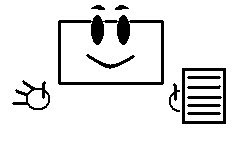
then you ask it save those files. mr pc then works frantically and saves it in your hard disk as fast as he can because, that's what he does.. he tries to work as fast as his tiny processor can dish out.
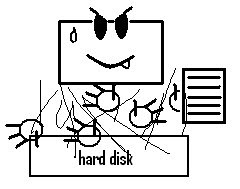
BUT there's a downside to this.. the files aren't always in the same place as one huge chunk. most of the time, it's in pieces. especially big files like, programs or games you installed. mr pc does know where each parts are and when you load them up, sometimes it takes mr pc a few moments to gather everything together.
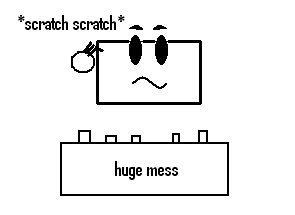
uh-oh.. here comes mr defrag-man and he is far from happy..
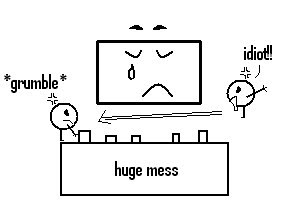
mr defrag-man now has to sort out the mess, so that stuff on mr pc works faster. so, the longer you haven't defragment your hard disk, the messier it is. remember when i told you you need at least 15% of free space? well, here is why.. mr defrag-man needs space to work with.. to place the separated files all together in one place temporarily while it finds a suitable place to place in, in one chunk. the best hard disk space it'll need is 25%. it'll defragment your files much faster.. here's how you do it.

a. To defragment your hard drives (in any Windows operating system), double-click on My Computer. Right-click on the c-drive and click on Properties. Click on the Tools tab and choose the bottom button, to Defragment Now… Click on the appropriate drive, and then on Defragment. This can take some time. Depending on your processing power, the amount of RAM you have available, the size and speed of your drive, and a few other things, this process can take 20 minutes, or hours. It is best to let this one run over night, as well, but it is well worth it.

it'll look something like this...
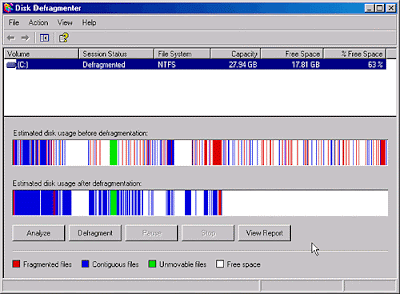
those red lines on the top bar are the mess.. and the blue lines are the neat sorted chunk of files. the bottom bar is the after picture. see how tidy it is? your pc will work much faster looking like that.

that's it from me but there are a lot of tips on how to speed up your pc. these were some of my easy ones that i very often do. questions are welcomed and i'll try my best to answer them.
click here for 10 top tips!